

Starter One-time
Free
Free No cost
A great fit for trying it out or a small gathering.
- 1 event
- Up to 30 guests
- Light mode + 2 palettes
- Invitation page (Classic)
- Collaborators (Editor/Viewer)
One polished link for parties, celebrations, and events of every kind—with digital seating, eInvites, RSVP, floor plans, and shared photos built in.

Use one feature or connect the full guest experience. The detailed guides live on their own pages, so this overview stays easy to scan.
Guests scan, search their name, and see their assigned table in seconds—then tap to view it on the floor plan.
Explore table lookup 02Share event details, collect responses, and offer optional meal choices in one link.
Explore eInvites 03Give everyone one QR code for sharing candid event photos in one gallery.
Explore photo sharing 04Keep guest lists, seating, floor plans, QR codes, collaborators, and updates connected.
Explore host toolsFrom a backyard birthday to a formal gala, Meet My Table helps hosts share details, guide arrivals, and collect the moments guests capture.
Browse event ideasReal screens from Meet My Table—simple enough for guests to use without instructions.
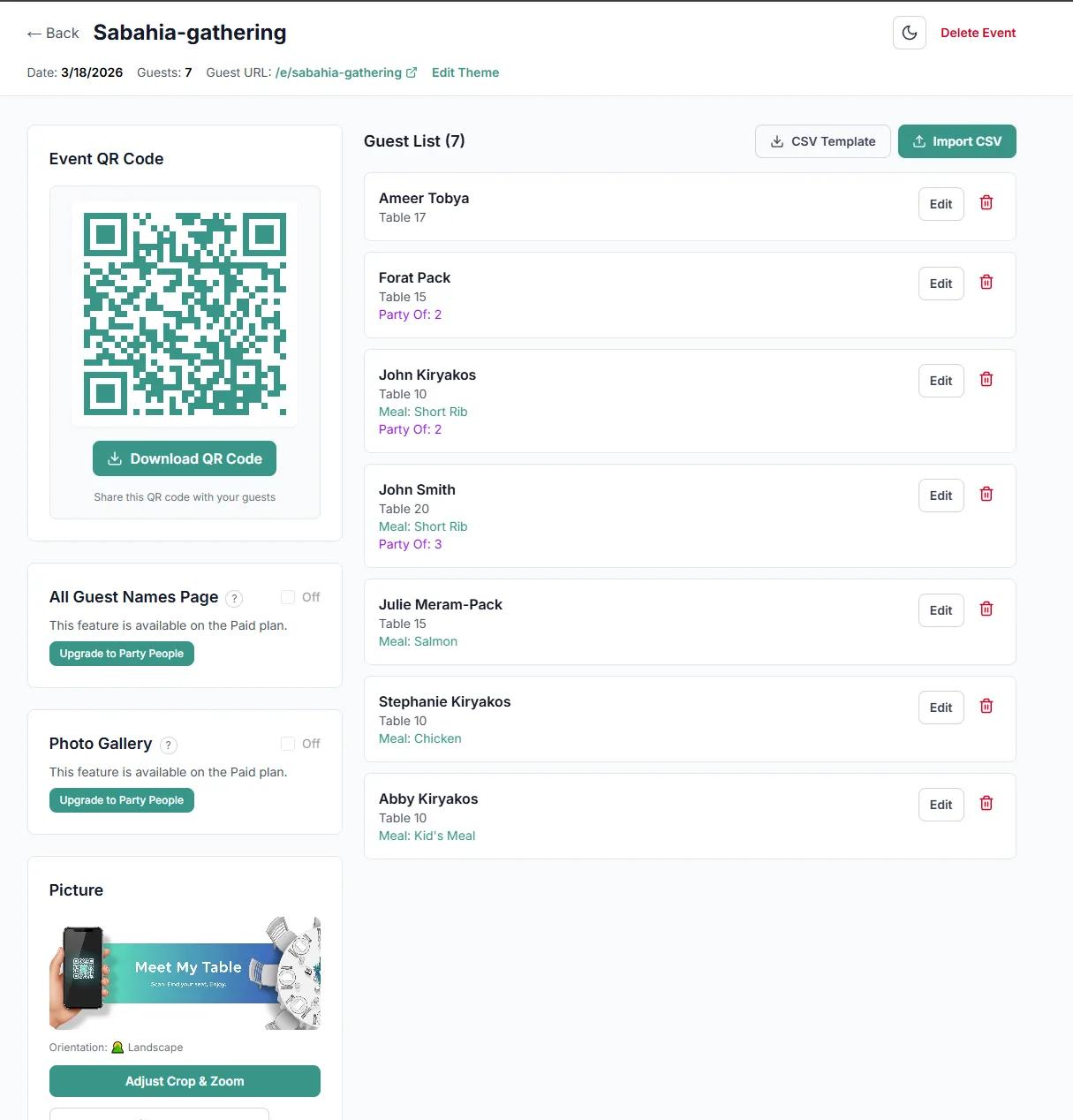
Manage guests, table assignments, QR codes, RSVP, floor plans, and enabled event features.
Explore host tools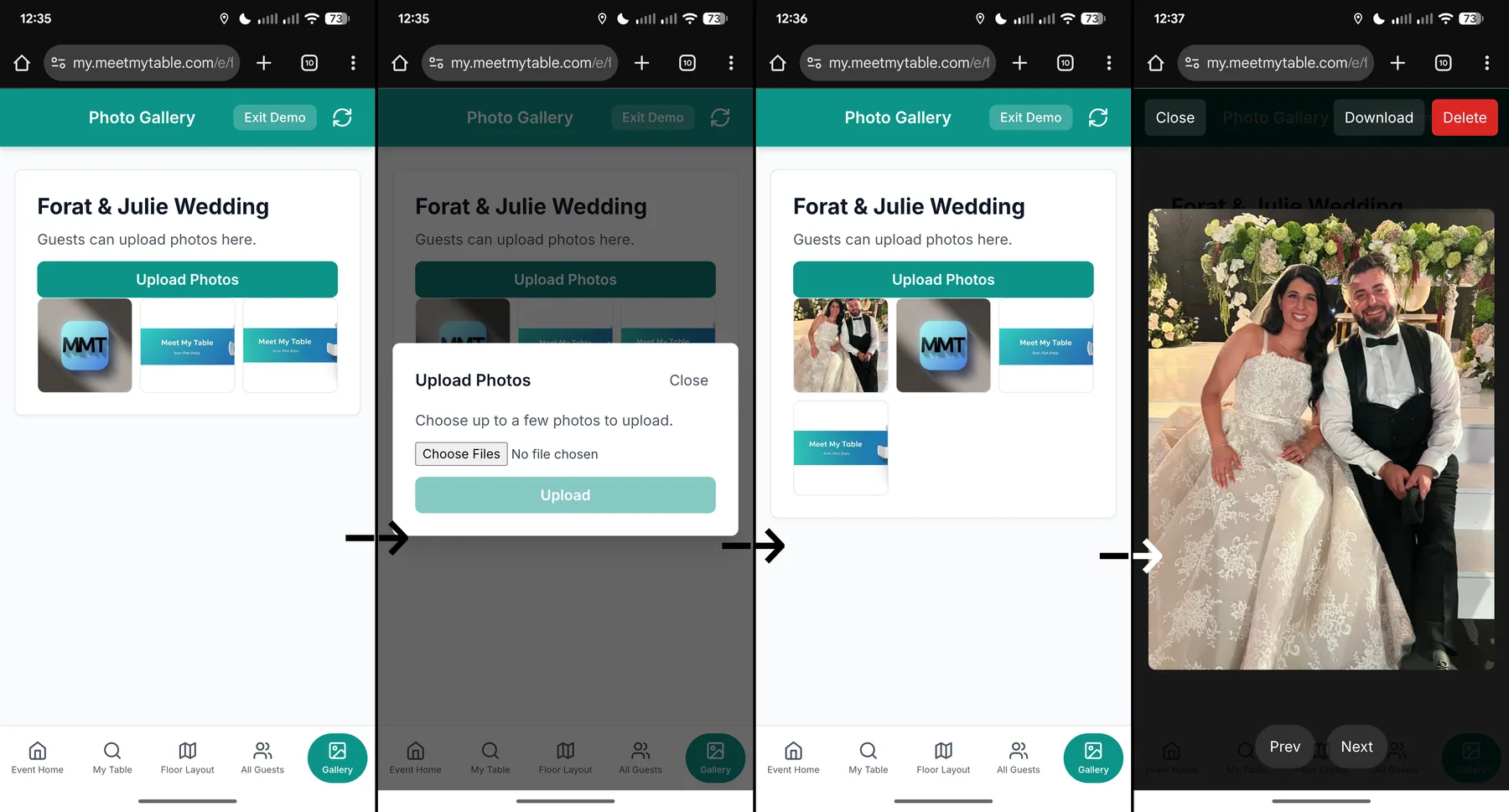
Guests upload their pictures through the browser, and the host keeps the originals together.
Explore photo sharing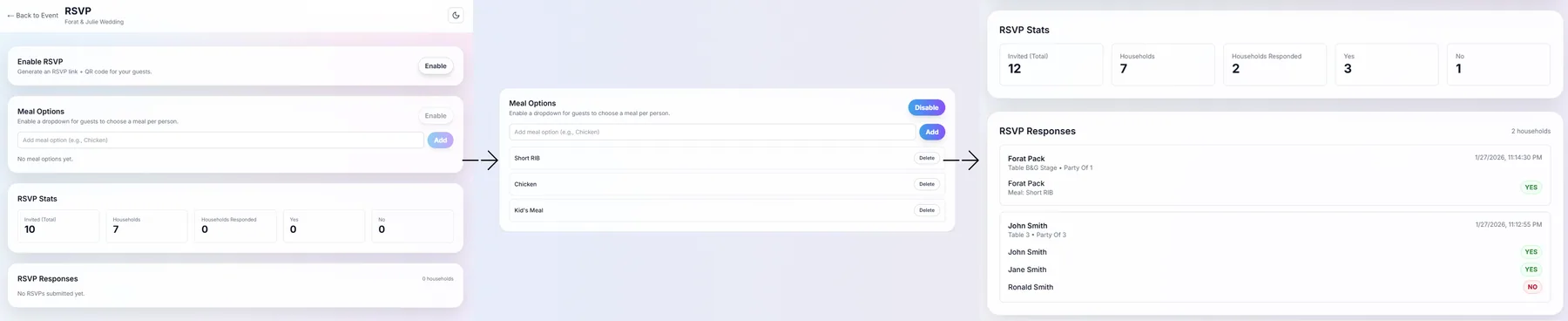
Connect a polished eInvite with RSVP, optional meal choices, and a clear response dashboard.
Explore eInvites & RSVPSketch your reception layout in minutes—labeled tables with chairs, the dance floor, stage, bars, and entrance. Publish the map and guests can tap their table number to see exactly where to go.

Add the date, guest list, and features you need.
Choose your look, links, floor plan, and QR codes.
They open everything in their browser—no app or account.
Start free, then upgrade when you want unlimited guests and paid-only guest features. Paid tiers are one-time payments (not subscriptions).
A great fit for trying it out or a small gathering.
Unlimited guests, full themes, and paid-only guest features.
Built for hosts managing two celebrations, a multi-day event, or a conference weekend.
Features and limits shown here are based on the current product brief.
| Feature | Free | Party People | Party Deluxe |
|---|---|---|---|
| Events | 1 | 1 | 2 |
| Guests per Event | 30 | Unlimited | Unlimited |
| RSVP | Yes | Yes | Yes |
| Meal selection (optional) | Yes | Yes | Yes |
| Theme Mode | Light only | Light & Dark | Light & Dark |
| Color Palettes | 2 (Teal, Blue) | All 6 | All 6 |
| Invitation Designs | Classic | Classic + Botanical + Modern + Custom Upload | Classic + Botanical + Modern + Custom Upload |
| Full Guest List Page | No | Yes | Yes |
| Photo Gallery | No | Yes | Yes |
| Collaborators (Editor/Viewer) | Yes | Yes | Yes |
| Auto-delete after event date | 7 days after event date | 14 days after event date | 30 days after event date |
Quick details for guests and hosts.
No. Meet My Table works entirely in your phone's web browser.
Try searching for just your first name or last name. If you still can't find yourself, try the 'All Guests' page (if the host has enabled it) or ask the host they may have spelled your name differently.
Guests do not create accounts. The event stores names and table assignments. If RSVP is enabled and you submit an RSVP, the event also stores your RSVP responses (and meal selections if enabled).
No. The photos are only available to the event host and guests who have access to the event.
If your host shared a floor plan, open Floor Plan from the event page. With a designed map, you can also tap your table number in Find your table to open the map with your table highlighted.
A standard CSV with headers. Required columns: Full Name and Table Number. Optional: Food Option, Party Of.
Yes. Edits are live immediately. Guests will see updated info on their next search.
Events are automatically deleted after the event date (7–30 days depending on plan). You can also delete your event manually at any time.
Open Floor Layout in your event dashboard to upload a floor plan or design one with labeled tables and landmarks like the dance floor or stage. Your work autosaves as a private draft and only reaches guests when you publish. Guests whose table matches a labeled table on the published map can tap their table number to see where to go.
No. But if you made a mistake, please reach out to support@meetmytable.com and we can help you.